
When building this site, my priority was to find the simplest solution—both in terms of development and hosting—at the lowest possible cost. In other words, I wanted something that wasn’t difficult to build and didn’t require paying for hosting.
Building a website can be boiled down to using HTML with CSS and JS. This combination is the foundation of the entire web as we know it. We could even skip JS and stick with just HTML (the structure and content) and CSS (the visual styling). We can open our favorite text editor and start working. All we need is Chrome or another browser to preview our work as we go.
But of course, implementing HTML and CSS—even at a basic level—requires some knowledge. That’s why, in the past, software that turned web development into a kind of layout process—like Dreamweaver—enjoyed some success. Of course, like any graphical tool that requires writing code, it was a mess behind the scenes, and over time, these tools fell out of favor.
Then there’s another complication: developing an entire website using only pure HTML/CSS is an inefficient way to work. Imagine having dozens of pages and having to update them one by one every time you make a change. Things get complicated, but luckily, there are CMSs.
Content Management System
Over time, and with the advent of new technologies, new software emerged, particularly Content Management Systems (CMS). When it comes to managing content, CMSs are the best option. Classics like Joomla and Drupal are still going strong, and then there are more modern options like Ghost CMS, Contentful, Strapi, Substack, etc.—and, of course, the giant, the king of them all: WordPress.
How does working with these CMSs differ from working with classic HTML? It’s a very broad topic that I’d like to address in the future, but basically, it’s about automating processes and development. CMSs are systems that manage content through a user-friendly, graphical dashboard; they have dynamic features, but most importantly, they use databases to generate each web page as requested. In our example, we wouldn’t have to create every new post in HTML and CSS—the system does it for us; we just focus on writing. It’s like using Microsoft Word.
But this convenience comes at a cost. When they aren’t paid web services, these are systems that require a server meeting certain specifications for installation. For example, WordPress is available for free and as a paid service. It’s free if you download it—just like downloading any program—and install it on a server that meets its requirements.
But WordPress requires hosting capable of running PHP and MySQL as a database. There’s no free option for that—or at least none that doesn’t include ads or some draconian terms. This is because this technology requires slightly more intensive resource usage, and a poor configuration can, in the worst-case scenario, bring down an entire server. As for paid options, if you simply go to wordpress.com, you can create an account and pay for the service.
I’ll write more about WordPress in the future—it’s my favorite CMS, and it’s what’s allowed me to make a living for many years. I think it’s incredible software, but it’s been in the eye of the storm (thanks, Matt) in recent years.
But I don’t want to spend money. I don’t want the hassle of paying for hosting just to install WordPress—having to set it up and maintain it, knowing that if I miss a payment one day, everything goes down. We want something free and long-lasting—does that even exist? Doesn’t that go against the entire business model of today’s web?
Well, thanks to Cloudflare, Vercel, and others, we can deploy static HTML websites—with CSS and JS—on these services’ networks for free. And without any ads getting in the way. Why? Because a website based on this technology doesn’t consume many resources; the servers don’t have to process any logic behind the pages—they just have to serve them. Static websites have many advantages: they’re fast, have no security issues (well, Next.JS proved otherwise), scale easily, and have no SEO issues.
However, as we mentioned at the beginning, they’re difficult to maintain and build. Or at least they were until Static Site Generators (SSGs) came along.
Static Site Generator
SSGs are tools that allow us to maintain pages more efficiently. They strike a balance between working with pure HTML/CSS/JS and using a CMS. We can create a structure that repeats across all the pages we specify, with the functionality we assign to them.
For example, in WordPress, if I want to change the logo, all I have to do is log in, find the option, make the change, and save it. The system will update the value in the database, and then every time a user visits our website, WordPress will automatically display the site with the new logo. In plain HTML, we’d have to manually edit the line of code that changes the logo on every page we build. With an SSG, we accomplish this by modifying the code in the relevant section, and the change is automatically replicated across all pages that use that section.
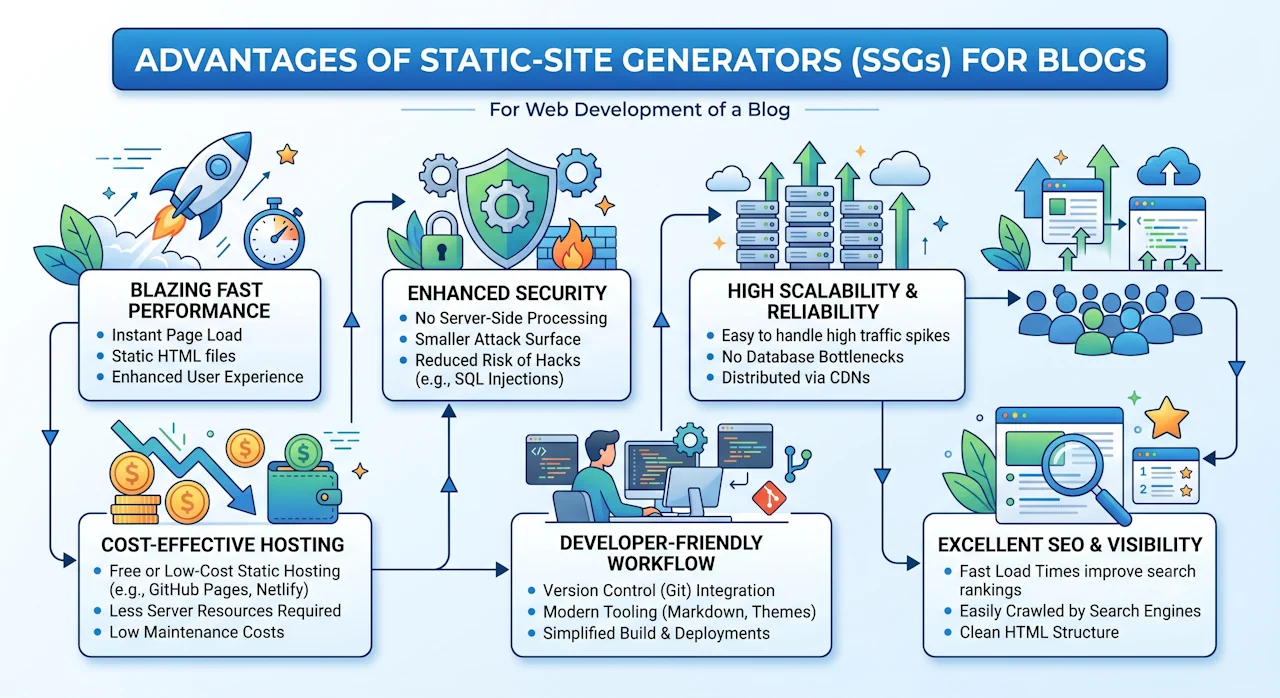
I won’t go into further detail here because it’s a complex topic; I’ll publish a more extensive and well-documented explanation later. The important thing is to understand that, in my opinion, using an SSG is the best option for a small website like this one right now.
This site uses an SSG—specifically Eleventy (11ty) — because I found it the easiest to use, and by hosting it on CloudFlare, I don’t have to worry about hosting or monthly maintenance.
Sure, it all sounds great, but here’s what might be the initial hurdle. Using an SSG requires that the chosen engine build the website on your PC, use GitHub, and have some knowledge of web development (or maybe not so much, thanks to AI).
I think there’s one thing I didn’t mention before: my goal is for this site to remain online over time, even without me. The thing is, while the hosting will remain on Cloudflare until they decide otherwise—which could be many years or not—the domain will remain active as long as I keep paying for it. And even if I stop paying at some point, I hope it will be archived on internetarchive.org.
I know I won't be around forever, so I'd like to leave a few words behind.